Back to BlogTypeScript 
React/Next.js 프로젝트에서 TypeScript 쓰는 방법들
이제 React 프로젝트에서 TypeScript는 선택이 아니다. 왜 그렇게 됐는지부터, 실제 쓰는 패턴들까지 한 번에 정리함
January 10, 2026
typescriptreactnextjspatternspropsgenerics
React로 프로젝트를 시작할 때 TypeScript 없이 시작하는 경우는 이제 거의 없을 것이다.
CRA(deprecated 됐지만...)도 기본 템플릿에 TypeScript를 넣었고, Next.js는 Typescript를 사용할 것인지 묻지만, 점차 TypeScript를 권장하는 추세이다.
근데 "왜 써야 하는지"를 제대로 납득하고 쓰는 경우는 생각보다 적다.
왜 React/Next.js에서 TypeScript가 기본이 됐나
규모가 커질수록 JS가 버텨주질 않는다
컴포넌트 하나, 페이지 하나일 때는 JS도 괜찮다.
근데 컴포넌트가 30개, 50개를 넘어가면 달라진다.
// 이 props가 뭔지 알려면?
function UserCard({ user, onAction, config }) {
  // user에 뭐가 있는지
  // onAction이 어떤 함수인지
  // config에 뭐가 들어오는지
  // 파일 열어서 직접 확인해야 함
}
JS에서는 컴포넌트를 사용하는 쪽이 props 구조를 외우거나, 정의 파일을 찾아가야 한다.
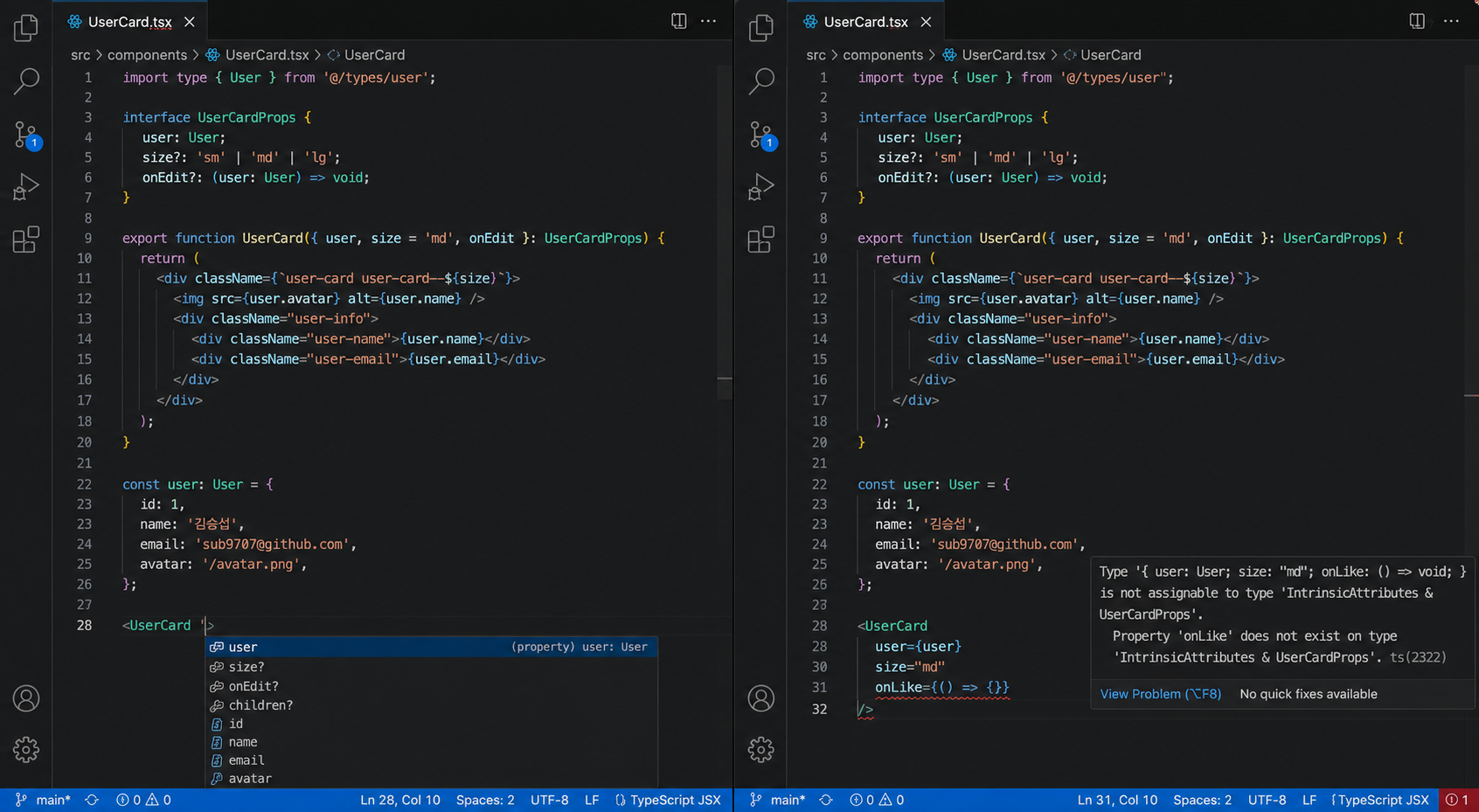
TypeScript를 쓰면 IDE에서 자동완성이 나온다. 잘못된 props를 넘기면 저장 전에 에러가 표시된다.
리팩토링이 겁나지 않게 된다
interface UserCardProps {
  user: User;
  onAction: (userId: number) => void;
}
User 타입에 필드가 추가되거나 제거되면, 그 타입을 쓰는 모든 컴포넌트에서 즉시 에러가 표시된다.
JS였으면 하나씩 쫓아가면서 런타임에서 터지는 걸 확인해야 했을 부분이다.
API 응답 타입이 명확해진다
interface ApiResponse<T> {
  data: T;
  status: number;
  message: string;
}

async function getUser(id: number): Promise<ApiResponse<User>> {
  const res = await fetch(`/api/users/${id}`);
  return res.json();
}
응답에서 꺼내는 데이터가 어떤 구조인지 코드만 봐도 안다.
.data.name이 string인지, .data.createdAt이 있는지 직접 확인할 필요가 없다.
Next.js가 TypeScript를 전제로 설계됐다
Next.js App Router의 params, searchParams, generateMetadata, generateStaticParams 등은 전부 TypeScript 타입이 정의되어 있다.
// page.tsx
type Props = {
  params: Promise<{ id: string }>;
  searchParams: Promise<{ q?: string }>;
};

export default async function Page({ params, searchParams }: Props) {
  const { id } = await params;
  const { q } = await searchParams;
}
타입 없이 쓰면 params가 뭔지 알기 어렵고, Next.js 버전이 올라갈 때 대응하기도 힘들다.
컴포넌트 props 타입 설계
기본 패턴
interface ButtonProps {
  label: string;
  onClick: () => void;
  disabled?: boolean;
  variant?: "primary" | "secondary" | "ghost";
}

function Button({ label, onClick, disabled = false, variant = "primary" }: ButtonProps) {
  return (
    <button
      onClick={onClick}
      disabled={disabled}
      className={`btn btn-${variant}`}
    >
      {label}
    </button>
  );
}variant를 string으로 쓰지 않고 리터럴 유니온으로 좁힌다.
"primary" | "secondary" | "ghost" 외의 값을 넘기면 컴파일 에러가 난다.
HTML 요소 props 확장
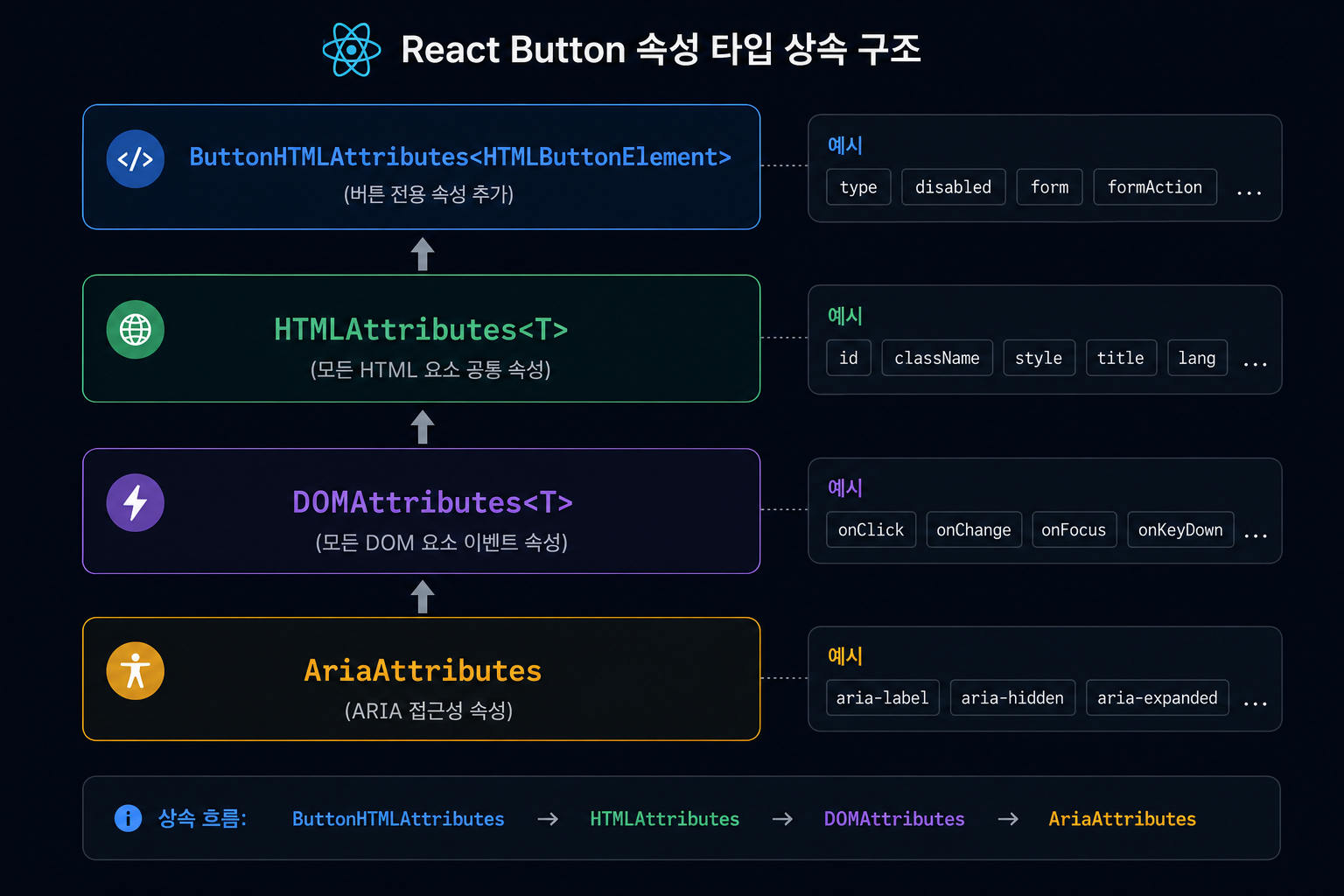
버튼 컴포넌트를 만들 때 onClick만 직접 정의하면 aria-label, type, form 같은 HTML 기본 속성을 쓸 수 없다.
interface ButtonProps extends React.ButtonHTMLAttributes<HTMLButtonElement> {
  variant?: "primary" | "secondary" | "ghost";
  loading?: boolean;
}

function Button({ variant = "primary", loading, children, ...props }: ButtonProps) {
  return (
    <button {...props} disabled={loading || props.disabled}>
      {loading ? <Spinner /> : children}
    </button>
  );
}React.ButtonHTMLAttributes<HTMLButtonElement>를 상속하면 HTML 버튼의 모든 속성이 그대로 사용 가능하다.
...props로 나머지 속성을 전달하면 type="submit", form="formId" 같은 것도 그냥 쓸 수 있다.
입력 요소면 React.InputHTMLAttributes<HTMLInputElement>, 앵커면 React.AnchorHTMLAttributes<HTMLAnchorElement>를 쓴다.
children 타입
interface CardProps {
  children: React.ReactNode;
  title?: string;
}React.ReactNode는 JSX, 문자열, 숫자, null, undefined, 배열 모두 허용한다.
단일 요소만 받고 싶으면 React.ReactElement를 쓴다.
interface WrapperProps {
  children: React.ReactElement; // JSX 하나만 허용
}
컴포넌트 타입
함수 컴포넌트의 타입을 명시할 때.
// 반환 타입을 명시하는 방법
function Header(): React.JSX.Element {
  return <header>...</header>;
}

// React.FC는 children을 자동으로 포함하지 않는다 (React 18부터)
const Header: React.FC<HeaderProps> = ({ title }) => {
  return <header>{title}</header>;
};React.FC를 쓸지 말지는 취향 차이가 있다.
반환 타입을 명시하는 쪽이 더 명확하다는 의견도 있고, 그냥 타입 추론에 맡기는 경우도 많다.
이벤트 핸들러 타입
입력값 처리
function SearchInput() {
  const [query, setQuery] = useState("");

  const handleChange = (e: React.ChangeEvent<HTMLInputElement>) => {
    setQuery(e.target.value);
  };

  const handleSubmit = (e: React.FormEvent<HTMLFormElement>) => {
    e.preventDefault();
    // 검색 처리
  };

  return (
    <form onSubmit={handleSubmit}>
      <input value={query} onChange={handleChange} />
    </form>
  );
}
e.target.value 접근이 타입 안전하다. HTMLInputElement가 아닌 요소에서 value를 꺼내면 에러가 난다.
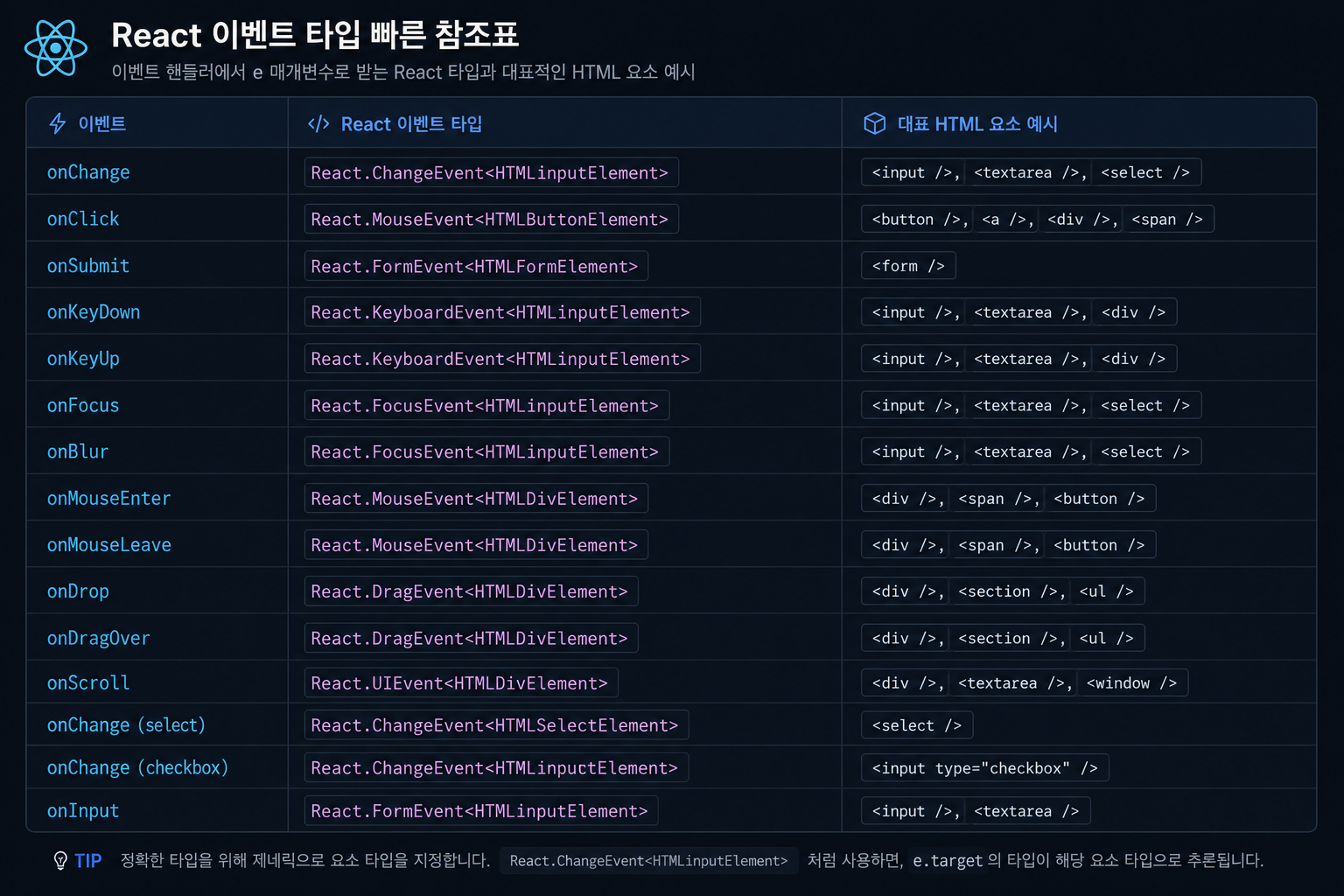
이벤트 타입 빠르게 찾는 법
어떤 이벤트에 어떤 타입을 써야 하는지 헷갈릴 때.
onChange, onFocus, onBlur → React.ChangeEvent<T>, React.FocusEvent<T>
onClick, onMouseEnter → React.MouseEvent<T>
onKeyDown, onKeyUp → React.KeyboardEvent<T>
onDrop, onDragOver → React.DragEvent<T>
onSubmit → React.FormEvent<T>
T에 해당 HTML 요소 타입을 넣는다.
useState 타입 지정
기본
const [count, setCount] = useState(0);          // number로 추론
const [name, setName] = useState("");            // string으로 추론
const [user, setUser] = useState<User | null>(null); // 명시 필요
초기값에서 타입을 추론할 수 없으면 제네릭으로 명시한다.
null로 시작하는 상태는 나중에 들어올 타입과 함께 User | null로 지정한다.
복잡한 상태
type LoadState<T> =
  | { status: "idle" }
  | { status: "loading" }
  | { status: "success"; data: T }
  | { status: "error"; message: string };

const [state, setState] = useState<LoadState<User>>({ status: "idle" });
Discriminated Union으로 상태를 모델링하면 불가능한 상태 조합을 원천 차단한다.
status === "success"일 때만 data에 접근 가능하다.
useRef 타입
DOM 참조
const inputRef = useRef<HTMLInputElement>(null);

useEffect(() => {
  inputRef.current?.focus();
}, []);

return <input ref={inputRef} />;useRef<HTMLInputElement>(null)로 초기값을 null로 지정한다.
접근할 때는 ?.로 null 체크를 해야 한다.
뮤터블 ref
const timerRef = useRef<ReturnType<typeof setTimeout> | null>(null);

function start() {
  timerRef.current = setTimeout(() => {
    // ...
  }, 1000);
}

function stop() {
  if (timerRef.current) {
    clearTimeout(timerRef.current);
  }
}setTimeout의 반환 타입이 브라우저(number)와 Node.js(NodeJS.Timeout)에서 다르다.
ReturnType<typeof setTimeout>을 쓰면 환경에 관계없이 올바른 타입이 된다.
제네릭 컴포넌트
같은 구조를 여러 데이터 타입에 재사용해야 할 때.
리스트 컴포넌트
interface ListProps<T> {
  items: T[];
  renderItem: (item: T, index: number) => React.ReactNode;
  keyExtractor: (item: T) => string | number;
}

function List<T>({ items, renderItem, keyExtractor }: ListProps<T>) {
  return (
    <ul>
      {items.map((item, index) => (
        <li key={keyExtractor(item)}>{renderItem(item, index)}</li>
      ))}
    </ul>
  );
}
// User 리스트
<List
items={users}
renderItem={(user) => <UserCard user={user} />}
keyExtractor={(user) => user.id}
/>
// Post 리스트
<List
items={posts}
renderItem={(post) => <PostCard post={post} />}
keyExtractor={(post) => post.slug}
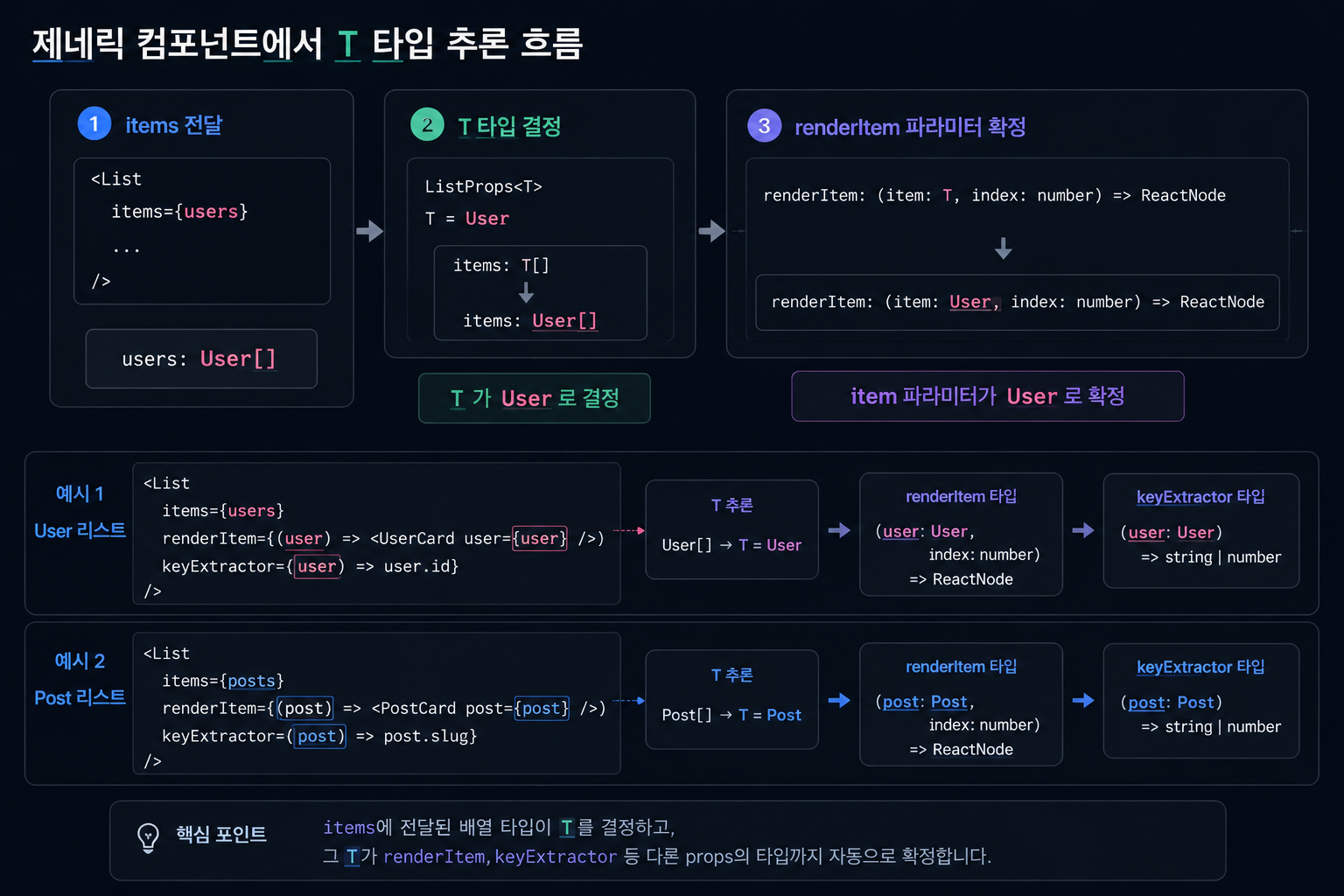
/>T가 자동으로 추론된다. items에 User[]를 넘기면 renderItem의 파라미터도 User가 된다.
선택 컴포넌트
interface SelectProps<T> {
  options: T[];
  value: T | null;
  onChange: (value: T) => void;
  getLabel: (option: T) => string;
  getValue: (option: T) => string | number;
}

function Select<T>({ options, value, onChange, getLabel, getValue }: SelectProps<T>) {
  return (
    <select
      value={value ? String(getValue(value)) : ""}
      onChange={(e) => {
        const selected = options.find((o) => String(getValue(o)) === e.target.value);
        if (selected) onChange(selected);
      }}
    >
      {options.map((option) => (
        <option key={getValue(option)} value={getValue(option)}>
          {getLabel(option)}
        </option>
      ))}
    </select>
  );
}
어떤 타입이든 getLabel, getValue로 표시 방법을 직접 지정한다.
Next.js 특화 패턴
params, searchParams 타입
App Router에서 params와 searchParams는 Next.js 15부터 Promise가 됐다.
// app/posts/[slug]/page.tsx
type Props = {
  params: Promise<{ slug: string }>;
  searchParams: Promise<{ page?: string }>;
};

export default async function PostPage({ params, searchParams }: Props) {
  const { slug } = await params;
  const { page = "1" } = await searchParams;

  const post = await getPost(slug);
  const pageNum = parseInt(page, 10);

  return <PostDetail post={post} page={pageNum} />;
}slug는 string이다. URL에서 넘어오는 값은 항상 문자열이라는 걸 잊지 않게 타입이 알려준다.
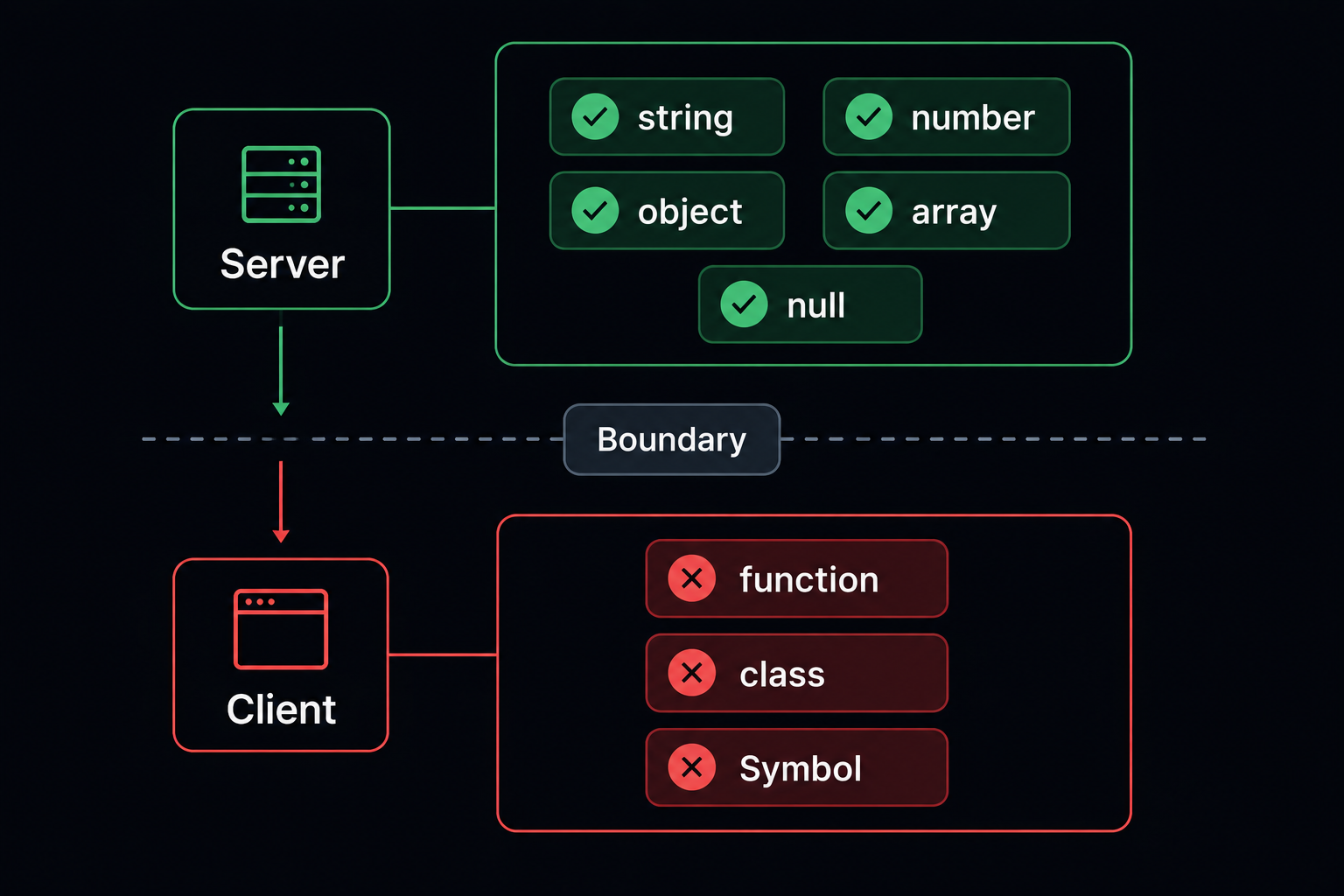
Server Component와 Client Component 경계
Server Component는 props로 함수를 받을 수 없다.
// Server Component — 함수 props 불가
interface ServerCardProps {
  post: Post;
  // onLike: () => void; // 이건 안 됨
}

// Client Component — 상호작용 담당
"use client";
interface LikeButtonProps {
  postId: number;
  initialCount: number;
}
Server Component의 props는 직렬화 가능한 값만 받는다.
함수, 클래스 인스턴스, Date 객체(직렬화 주의), Symbol은 넘길 수 없다.
타입으로 이 경계를 명확히 하면 실수를 줄일 수 있다.
fetch 응답 타입
async function getPosts(): Promise<Post[]> {
  const res = await fetch("/api/posts", { next: { revalidate: 60 } });

  if (!res.ok) {
    throw new Error(`Failed to fetch posts: ${res.status}`);
  }

  return res.json() as Promise<Post[]>;
}res.json()의 반환 타입은 any다. as Promise<Post[]>로 타입을 좁혀야 자동완성이 된다.
런타임에 실제 응답이 Post[]인지는 Zod 같은 런타임 검증 라이브러리로 확인할 수 있다.
generateMetadata 타입
import type { Metadata } from "next";

export async function generateMetadata({ params }: Props): Promise<Metadata> {
  const { slug } = await params;
  const post = await getPost(slug);

  return {
    title: post.title,
    description: post.description,
    openGraph: {
      title: post.title,
      images: [post.thumbnail],
    },
  };
}
Metadata 타입을 import해서 반환 타입으로 명시하면, 잘못된 필드명을 쓰면 에러가 난다.
커스텀 훅 타입
반환 타입 명시
interface UseCounterReturn {
  count: number;
  increment: () => void;
  decrement: () => void;
  reset: () => void;
}

function useCounter(initialValue = 0): UseCounterReturn {
  const [count, setCount] = useState(initialValue);

  return {
    count,
    increment: () => setCount((c) => c + 1),
    decrement: () => setCount((c) => c - 1),
    reset: () => setCount(initialValue),
  };
}
반환 타입을 인터페이스로 빼두면 훅을 쓰는 쪽에서 자동완성이 정확하게 나온다.
제네릭 훅
interface UseAsyncState<T> {
  data: T | null;
  loading: boolean;
  error: string | null;
  refetch: () => void;
}

function useAsync<T>(fetcher: () => Promise<T>): UseAsyncState<T> {
  const [data, setData] = useState<T | null>(null);
  const [loading, setLoading] = useState(true);
  const [error, setError] = useState<string | null>(null);

  const fetch = useCallback(async () => {
    setLoading(true);
    setError(null);
    try {
      const result = await fetcher();
      setData(result);
    } catch (e) {
      setError(e instanceof Error ? e.message : "Unknown error");
    } finally {
      setLoading(false);
    }
  }, [fetcher]);

  useEffect(() => {
    fetch();
  }, [fetch]);

  return { data, loading, error, refetch: fetch };
}
const { data: user, loading } = useAsync(() => getUser(userId));
// data: User | null
// loading: booleanfetcher의 반환 타입에서 T가 추론된다.
타입 단언보다 타입 가드
타입 단언은 최후의 수단
// 나쁜 패턴
const user = data as User; // 실제로 User인지 보장 없음

// 좋은 패턴
function isUser(value: unknown): value is User {
  return (
    typeof value === "object" &&
    value !== null &&
    "id" in value &&
    "name" in value
  );
}

if (isUser(data)) {
  console.log(data.name); // 타입 안전
}as는 TypeScript를 설득하는 게 아니라 속이는 것이다.
타입 가드를 쓰면 실제로 검사하고 좁혀준다.
API 응답 검증
function assertIsArray<T>(value: unknown): asserts value is T[] {
  if (!Array.isArray(value)) {
    throw new Error("Expected array");
  }
}

const response = await fetch("/api/posts").then((r) => r.json());
assertIsArray<Post>(response);
// 이후 response: Post[]
asserts 타입 가드는 통과하면 타입이 좁혀지고, 실패하면 예외를 던진다.
실전에서 자주 쓰는 유틸리티
컴포넌트 props 재사용
// 컴포넌트 props 타입 꺼내기
type ButtonProps = React.ComponentProps<typeof Button>;
type InputProps = React.ComponentProps<"input">;

// 특정 props를 골라서 새 타입 만들기
type ButtonStyleProps = Pick<ButtonProps, "variant" | "size">;
이미 만든 컴포넌트의 props 타입을 다른 곳에서 참조할 때 유용하다.
조건부 props
어떤 props가 있을 때만 다른 props가 필요한 경우.
type TooltipProps =
  | { hasTooltip: true; tooltipText: string }
  | { hasTooltip?: false; tooltipText?: never };

interface CardProps {
  title: string;
  tooltip: TooltipProps;
}
// tooltipText 없이 쓸 때
<Card title="제목" tooltip={{ hasTooltip: false }} />
// tooltipText 있어야 할 때
<Card title="제목" tooltip={{ hasTooltip: true, tooltipText: "설명" }} />
// 오류: hasTooltip이 true인데 tooltipText가 없음
<Card title="제목" tooltip={{ hasTooltip: true }} />Discriminated Union으로 조건부 props를 강제한다.
정리
TypeScript가 React/Next.js에서 기본이 된 건 그냥 유행이 아니다.
컴포넌트가 많아질수록, 팀이 커질수록, 코드베이스가 오래될수록 타입이 없으면 유지보수가 점점 힘들어진다.
TypeScript는 코드를 읽는 도구이기도 하고, 리팩토링할 때 안전망이 되기도 한다.
처음에 타입 쓰는 게 번거롭게 느껴지더라도, 나중에 "이 값이 뭐였더라"를 덜 하게 된다는 게 핵심이다.